You’ve lost the combination to your Master Lock lockbox and can’t access what’s inside—whether it’s keys, tools, or important documents. This is a frustrating situation, especially if the lock is attached to something or you don’t have the original instructions. The good news is that Master Lock does offer support for certain models, but only if you have a serial number and meet specific conditions.
This guide walks you through the official, research-backed steps to reset your lockbox when the combination is lost. You’ll learn how to locate your serial number, use Master Lock’s recovery process, access model-specific reset instructions, and even request a replacement reset tool. For electronic models, we cover battery replacement and how to use the Master Lock Vault app. By the end, you’ll know exactly what to do—and what to expect—based on Master Lock’s official support resources.
Understanding the Challenge of a Lost Master Lock Combination
Losing your Master Lock lockbox combination can feel like a dead end, but the reality is that resetting the lock without the current combination is not possible for most models. This limitation exists because Master Lock’s internal systems are designed to protect user security—your combination is not stored in a database unless specific conditions are met.

Why Resetting Without the Combination Is Often Impossible
- Most standard Master Lock lockboxes cannot be reset without knowing the current combination.
- Attempting to force or bypass the lock may damage the mechanism or render it unusable.
- Without the correct combination, the lock remains locked, and no official reset method exists for these models.
- Master Lock explicitly states that you cannot reset a lock without knowing the current combination—this is a fundamental security feature.
The Role of Serial Numbers in Recovery
- If your lock has a serial number, Master Lock may be able to assist in recovering the combination.
- The serial number is typically located on the back or bottom of the lockbox and is required for official recovery.
- Locks without a serial number cannot be traced or recovered by Master Lock, as no record of the combination exists.
- Always check for a serial number before attempting to recover your combination—this single detail determines whether recovery is possible.
Practical Tip: If you don’t know whether your lock has a serial number, carefully inspect the back or base of the lockbox. If one is present, keep it in a safe place. If not, recovery through Master Lock is not an option.
Accessing Official Instructions for Resetting Your Lockbox
When resetting your Master Lock lockbox, the most reliable and accurate guidance comes directly from Master Lock’s official resources. These materials are tailored to specific models and provide step-by-step instructions to set or reset your combination safely and correctly. Using the right documentation ensures you follow the exact process for your lockbox, reducing the risk of damage or failure.
Finding the Instruction Sheet for Your Model
Master Lock provides downloadable instruction sheets for many of its lockbox models. These sheets include detailed, model-specific steps for setting or resetting combinations. To locate the correct sheet:
- Identify your lockbox model number (e.g., 5400D, 5401D, 5422D, 5423D, 5424D, 5425D, 5406D, 5404DHC, 175, 176, 177, 178, 643D, 643DWD, 653D, 1550, 1520D, 1523D, 1524D, 1534D).
- Visit Master Lock’s official support page and search for your model.
- Download or print the instruction sheet for future reference.
Practical Tip: Keep a printed copy in a secure location. This ensures you can reset your combination anytime, even if you lose access to digital files.
Using the Master Lock Instructional Video
For visual learners, Master Lock offers official instructional videos that walk you through the process step by step. These videos are especially helpful for understanding the physical movements required to reset the combination.
- Watch the video for your specific model to see the correct technique.
- Videos are available for models including:
- 5400D & 5401D SafeSpace® Lock Boxes
- 5422D & 5423D Push Button Lock Boxes
- 5424D SafeSpace® Portable Light Up Dial Lock Boxes
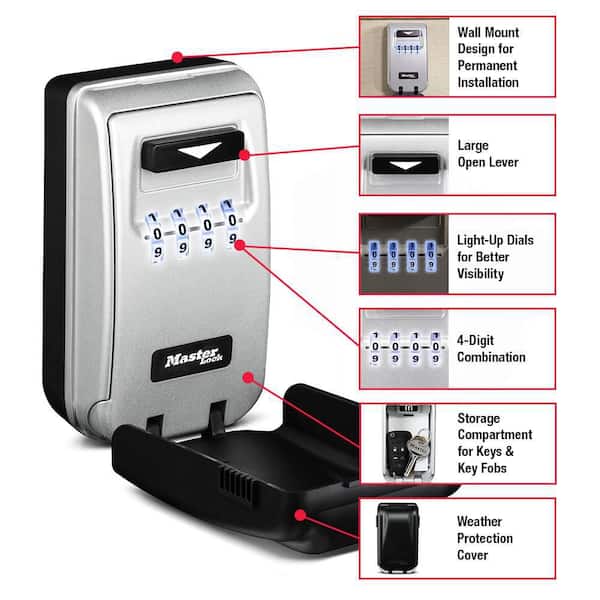
- 5425D SafeSpace® Wall Mount Light Up Dial Lock Boxes
- 5406D SafeSpace® Portable Lock Box
- Videos are hosted on Master Lock’s official support video page and include clear demonstrations of the reset process.
Note: Always ensure the lock is not attached to anything before attempting a reset. Master Lock will not assist with combination recovery if the lock is secured to a surface.
Using Your Lock’s Serial Number to Recover or Reset the Combination
A serial number is required to initiate a combination recovery request with Master Lock. Without it, Master Lock cannot retrieve your combination, as they do not maintain records for locks without serial numbers.

How to Locate Your Lock’s Serial Number
The serial number is typically located on the back or bottom of the lockbox. Look for a series of numbers and letters etched into the metal. It may be labeled as “Serial No.” or “S/N.” Ensure the number is clearly visible and legible before proceeding.
Submitting a Request to Master Lock for Combination Recovery
To recover your combination, submit a request using one of two methods:
- Visit a Master Lock distributor or retailer in person with the lockbox.
- Send a clear photo via the Contact Us form on Master Lock’s official support website.
Important requirements:
– The lock must be completely unattached from any surface or object.
– Take a photo from multiple angles, ensuring the serial number is fully visible and the lock is not secured.
– For inmates in correctional facilities, requests must be submitted on official letterhead and signed by a facility official.
Resetting the Combination on Specific Master Lock Lockbox Models
Resetting the 5400D and 5401D SafeSpace® Lock Boxes
These models feature a reset lever mechanism for changing the combination. Follow these steps carefully:
- Open the lockbox using the current combination.
- Locate the reset lever on the inside of the lock mechanism—typically near the dial assembly.
- Push the reset lever to the left and down firmly.
- While holding the lever in place, rotate each dial to your desired new combination.
- Release the lever. The lock is now set to the new combination.
Always refer to the official instruction sheet for visual guidance. The initial factory combination is 0-0-0-0.
Resetting the 5422D and 5423D Push Button Lock Boxes
These models use a push-button reset method. To reset:
- Open the lockbox using the current combination.
- Locate the small reset button on the inside of the compartment.
- Press and hold the reset button while rotating the dials to your new combination.
- Release the button once the new combination is set.
- Test the new combination by locking and unlocking the box.
Ensure the button is fully depressed during the process. The instruction sheet provides detailed visuals.
Resetting the 5424D and 5425D Light Up Dial Lock Boxes
These models use a dial-based reset process with a built-in mechanism. To reset:
- Open the lockbox using the current combination.
- Locate the reset lever or button on the internal mechanism.
- Push the reset lever down and to the left (or press the button) to initiate reset mode.
- Rotate the dials to your new combination.
- Release the lever or button. The lock is now set.
A reset tool may be required for some units. Master Lock can provide a replacement tool upon request. Always consult the model-specific instruction sheet before beginning.
Alternative Support Options When Resetting Fails
Contacting Master Lock Customer Support
If the reset process fails or isn’t possible, Master Lock’s customer solutions group can assist with:
- Lost combinations
- Key replacements
- Lock maintenance
- Issues with specialized or Bluetooth-enabled lockbox models
Support is available through the official Contact Us form on the Master Lock website. You may also visit a local Master Lock distributor or retailer for in-person help.
Be prepared to provide:
– Model number
– Serial number (if available)
– Detailed description of the issue
This information helps the team identify your lockbox and offer accurate support.
Requesting a Replacement Reset Tool
Master Lock may issue a free replacement reset tool if you’re unable to complete the reset process. To request one:
- Submit either:
– The model number of your lockbox, or
– A clear image of the lock showing the reset mechanism - Use the Contact Us form or visit a distributor
- Include proof of ownership (e.g., purchase receipt or photo of the lock with serial number)
The tool is typically shipped via mail and may take several business days to arrive.
Note: This support is only available for certain models. Always document your request and keep records of all communication.
Preventing Future Combination Loss with Master Lock Vault
Storing Your Combination in Master Lock Vault
Master Lock Vault is a secure, digital platform designed to safely store your lockbox combinations and access codes. Once registered, you can store your combination at no extra charge and retrieve it anytime, eliminating the risk of permanent loss. This service is especially valuable for users of Set-Your-Own Combination locks, where the ability to reset or recover a lost combination is limited. By storing your combination immediately after setting it, you create a reliable backup that ensures uninterrupted access.
- Store your combination as soon as you set it—don’t delay.
- Access your stored data from any device with the Master Lock Vault app.
- Your information is encrypted and protected with industry-standard security.
- No additional fees are charged for storing combinations or key numbers.
Using Master Lock Vault for Digital Access Control
Beyond simple storage, Master Lock Vault enables real-time digital access control, making it ideal for both residential and commercial use. The platform allows you to issue, revoke, or modify access permissions for individuals or teams instantly—perfect for property managers, contractors, or homeowners sharing access. Dedicated apps are available for both home and enterprise users, ensuring seamless control across devices.
- Issue temporary or permanent access codes remotely.
- Revoke access immediately if a user no longer needs it.
- Monitor access history and activity logs.
- Use the Master Lock Vault Home app to access the unique backup master code for Bluetooth locks—this code is only available after registration and cannot be retrieved otherwise.
Pro Tip: Always register your Bluetooth-enabled lockbox in the Master Lock Vault Home app immediately after setup to secure access to the backup master code and ensure long-term usability.
Support for Bluetooth and Electronic Master Lock Lockboxes
Electronic Master Lock lockboxes—such as the 4400, 4401, 6400, and 4901 models—require specific support procedures due to their digital features and connectivity. Unlike traditional combination locks, these models rely on battery power, app integration, and secure digital access, making proper maintenance and setup essential for continued functionality.
Battery Replacement and Low Battery Indicators
- A yellow LED light indicates a low battery, signaling the need for replacement.
- Battery types vary by model:
- 4400: CR2450 lithium button cell (lasts ~2 years with regular use).
- 4401: CR2 lithium battery (lasts up to 5 years).
- 6400: CR123A battery (lasts ~2 years).
- After replacing the battery, it may take up to 72 hours for the yellow LED to fully turn off.
- Use only the correct battery type to avoid damage or malfunction.
- If the lock is locked and the battery dies, an external battery can be used temporarily to open the lock.
Using the Master Lock Vault App for Access and Management
- The Master Lock Vault Home app (available on iOS and Android) is required to manage access, set codes, and monitor lock activity.
- Register your electronic lock in the app immediately after setup to unlock full functionality.
- After registration, the unique backup master code becomes accessible—this code is critical for emergency access and cannot be retrieved without registration.
- Use the app to issue temporary or permanent access codes, revoke user permissions, and view access logs.
- For enterprise users, the Master Lock Vault Enterprise app offers team-based access control and centralized management.
Conclusion
If you’ve lost your Master Lock lockbox combination, the first step is to check whether your lock has a serial number—this is essential for recovery. Without it, Master Lock cannot retrieve your combination, and resetting the lock without the current code is not possible for most models. If you have a serial number, submit a photo of the lock (unattached) via Master Lock’s Contact Us form or visit a distributor to request help.
For models that support it, use the official instruction sheets or videos to reset the combination properly. Always store your new combination securely—ideally in Master Lock Vault—to prevent future loss. For Bluetooth-enabled lockboxes, register your device in the Master Lock Vault app immediately to access the backup master code and manage access remotely.
FAQ
Can I reset my Master Lock lockbox if I forgot the combination?
No, you cannot reset the combination without knowing the current one. Master Lock does not provide lost combinations for locks that are attached to anything. If your lock has a serial number and is unattached, you may be able to recover the combination by contacting Master Lock with proof of ownership and a photo of the lock.
What should I do if my lock doesn’t have a serial number?
If your lock lacks a serial number, Master Lock cannot help recover the combination. They do not maintain records for locks without serial numbers. In this case, resetting the combination is not possible, and you may need to replace the lock.
How can I get a replacement reset tool for my Master Lock?
Master Lock can issue a free replacement reset tool upon request. Provide the model number or a clear photo of your lock to the customer support team via the Contact Us form. This service is available for certain models and requires proof of ownership.
Is there a way to store my combination securely?
Yes, use Master Lock Vault to securely store your combination at no extra cost. This digital platform allows you to save and retrieve your combination anytime. It’s especially useful for Set-Your-Own Combination locks and provides encrypted, password-protected access.
What do I do if my Bluetooth lock shows a yellow light?
A yellow light indicates a low battery. Replace the battery with the correct type (CR2450, CR2, or CR123A depending on the model). After replacement, it may take up to 72 hours for the light to turn off. Use the Master Lock Vault app to access the backup master code after registration.
Can I reset the combination on a lock that’s attached to something?
No. Master Lock will not assist with combination recovery if the lock is attached to any object. You must remove the lock from its mounting surface before attempting to reset or recover the combination.